Werewolf – Play Mafia/Werewolf Without Cards!
Want to spice up your lunch break with a thrilling game of Werewolf (Mafia) but forgot the cards? Dreading the role of the Moderator because the rules and night phases are too complicated to remember?
This is a web-based Game Manager & Role Dealer designed specifically for casual groups and office breaks. No installation required—just open it on a phone and play!
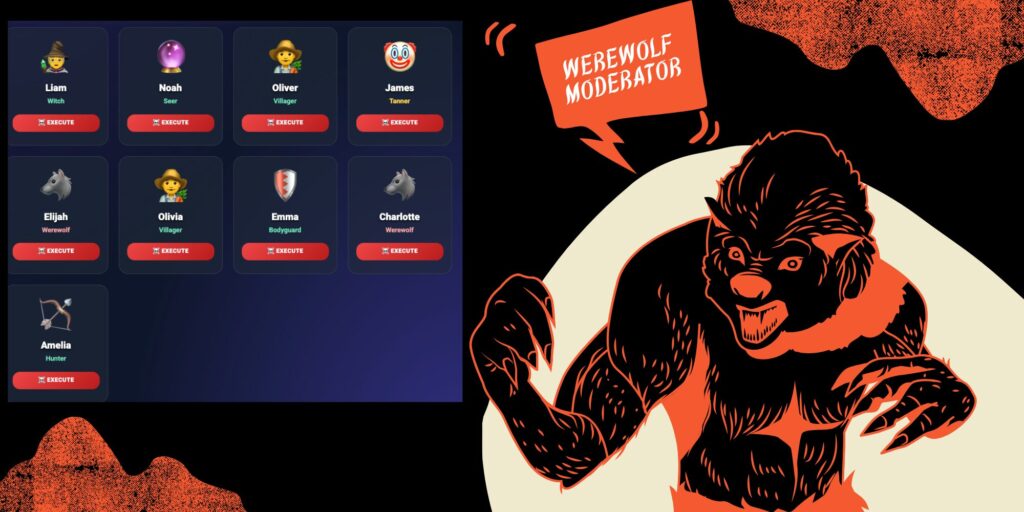
USER GUIDE
STEP 1: SETUP
-
Enter Names: Type the names of all players into the text box (one name per line).
-
Configure Roles:
-
Click “⚙️ Auto Config” to let the system recommend a balanced setup.
-
Or manually adjust the number of Seers, Wolves, Witches, etc., in the Special Roles section.
-
-
Click “DISTRIBUTE CARDS” to proceed.
STEP 2: SECRET DEAL (Pass the Phone)
This replaces physical cards.
-
The Host hands the phone to the player whose name appears on the screen.
-
The player ensures no one is peeking, then taps the card to Reveal Role.
-
After memorizing their role (e.g., “You are a Werewolf”), they click “OK” to hide it.
-
Pass the phone to the next person on the list.
-
Once everyone has seen their role, the Host takes the phone back and clicks “👑 START GAME”.
STEP 3: GAME MANAGER (The Host)
The interface now switches to the Manager Dashboard.
🌞 DAY PHASE:
-
Players discuss to find the Wolves.
-
If the village votes to eliminate someone, the Host clicks the “☠️ EXECUTE” button on that player’s card.
-
The dead player’s card will turn dark and show a “DEAD” stamp.
🌙 NIGHT PHASE:
-
The Host clicks “🌙 START NIGHT”.
-
The app guides the Host through each active role via popup dialogs:
-
Wolves: Ask “Who do you want to kill?” -> Select target -> Click Next.
-
Seer: Select a player to check -> App reveals if they are “GOOD” or “EVIL” -> Signal the Seer silently.
-
Witch/Guard: Select targets for potions or protection.
-
Note: The app skips roles that are dead or not in the game.
-
-
Once the night sequence ends, a “SUNRISE” screen appears with the results (Who died, who survived). Read this aloud to the village.
💡 TIPS
-
Settings (Gear Icon): Enable “Blind Manager Mode” if the Host wants to play along! Roles on the manager screen will be hidden as
???(only revealed when a player dies). -
Game Log: Click “📜 Log” to see a history of events (who killed whom, who saved whom) in case you forget.